How to Use Docker to Host Multiple Apps on One VPS (Beginner-Friendly Step-by-Step Guide)

Have you ever rented a VPS and thought, “I am paying for all this power, but I am only running one website”?
I have been there. Years ago, I ran one small blog on a VPS that could easily handle five apps, but fear stopped me. Fear of breaking things. Fear of complicated setups. Fear of downtime.
That changed the day I discovered Docker.
Today, I want to walk you through how to use Docker to host multiple apps on one VPS, in a way that actually makes sense. No jargon overload. No confusing theory dumps. Just practical guidance, real examples, and lessons learned from experience.
If you are a blogger, developer, startup founder, or someone running multiple websites, this guide will save you money, time, and headaches.
Let’s dive in.
What Is Docker and Why It Is Perfect for a VPS
Docker is a containerization tool. In simple words, it lets you package an application with everything it needs to run.
Think of Docker containers like separate rooms in one big house.
Each room has its own furniture, its own lock, and its own purpose, but all rooms share the same foundation.
On a VPS, this is gold.
Instead of installing PHP, Node, Python, databases, and servers directly on your VPS and hoping nothing conflicts, Docker keeps everything isolated.
Why this matters:
- No dependency conflicts
- Cleaner server
- Easy backups and migrations
- Consistent behavior across environments
That is why learning how to use Docker to host multiple apps on one VPS is one of the smartest moves you can make.
Why Hosting Multiple Apps on One VPS Is a Smart Idea
Let me ask you something.
Why pay for three VPS servers when one powerful VPS can do the job?
Hosting multiple apps on one VPS helps you:
- Reduce monthly hosting costs
- Centralize management
- Scale efficiently
- Use resources properly
Many people waste CPU and RAM simply because they fear complexity. Docker removes that fear.
With proper planning, you can host:
- WordPress sites
- Node.js apps
- APIs
- Admin dashboards
- Databases
All on a single VPS, safely and efficiently.
How Docker Solves VPS Hosting Problems
Traditional VPS hosting has problems:
- Software conflicts
- Hard upgrades
- Messy server setups
- Risky manual changes
Docker fixes these by design.
Each app runs in its own container, isolated from others. If one app crashes, others keep running. If one app needs an update, you update only that container.
This is the real power behind docker vps hosting and why professionals swear by it.
What You Need Before Using Docker on a VPS
Before we start, let’s get realistic.
You do not need to be an expert, but you should have:
- A VPS (Ubuntu 20.04 or 22.04 recommended)
- Root or sudo access
- Basic command line knowledge
- Domain names (optional but useful)
That’s it.
No advanced Linux degree required.
Step by Step Guide to Install Docker on a VPS
Installing Docker is easier than most people think.
Step 1: Update Your VPS
sudo apt update && sudo apt upgrade -y
Step 2: Install Docker
curl -fsSL https://get.docker.com | sudo sh
Step 3: Verify Docker Installation
docker --version
If you see a version number, you are good to go.
Step 4: Install Docker Compose
sudo apt install docker-compose -y
Docker Compose will help you manage multiple apps easily.
Understanding Docker Images Containers and Networks
This part scares beginners, but trust me, it is simple.
- Image: A blueprint of an app
- Container: A running instance of that image
- Network: How containers talk to each other
Example:
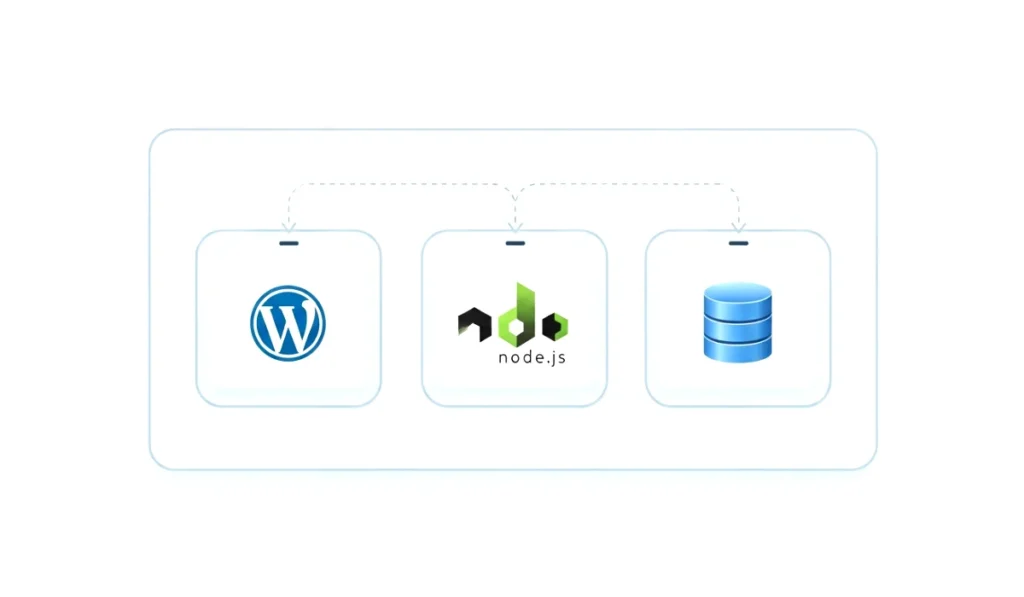
- WordPress image
- MySQL image
- Nginx image
Each runs as its own container, but they connect through a Docker network.
Once you understand this, hosting multiple apps on a VPS becomes logical, not scary.
How to Host Multiple Apps Using Docker Containers
Here is the core idea.
Each app gets:
- Its own container
- Its own ports
- Its own volumes
You never install apps directly on the VPS anymore.
For example:
- App 1: WordPress on port 8081
- App 2: Node app on port 8082
- App 3: Admin panel on port 8083
Docker keeps them isolated and organized.
This is the foundation of how to use Docker to host multiple apps on one VPS.
Using Docker Compose to Manage Multiple Apps
Docker Compose is where life gets easy.
Instead of running many commands, you define everything in one file called docker-compose.yml.
Example structure:
- Services section
- Networks section
- Volumes section
With one command:
docker-compose up -d
All apps start together.
With one command:
docker-compose down
All apps stop safely.
For beginners, Docker Compose is not optional. It is essential.
Setting Up Domains and Reverse Proxy with Docker
Now let’s talk about real websites.
You do not want users visiting ports like :8081.
This is where reverse proxy comes in.
Tools like:
- Nginx Proxy Manager
- Traefik
- Caddy
They run as Docker containers too.
Benefits:
- Automatic SSL
- Clean domain routing
- Centralized traffic control
Example:
- site1.com goes to WordPress container
- api.site1.com goes to Node container
- admin.site1.com goes to admin app
This setup is professional and scalable.
Security Best Practices for Docker VPS Hosting
Security matters. Especially when hosting multiple apps.
Best practices:
- Use official Docker images
- Never expose unnecessary ports
- Use strong passwords
- Enable firewall on VPS
- Use SSL for all domains
- Keep Docker updated
Docker itself is secure, but bad configuration is not.
Follow these rules and your containerized apps hosting will be safe.
Performance Optimization Tips for Docker on VPS
Docker is lightweight, but smart tuning helps.
Tips:
- Limit container memory usage
- Monitor CPU usage
- Use lightweight images
- Clean unused images regularly
- Avoid running too many databases
A single VPS can host many apps, but balance is key.
Common Mistakes Beginners Make with Docker
I made these mistakes too.
Avoid:
- Running everything as root
- Ignoring backups
- Hardcoding secrets in files
- Exposing databases to the internet
- Running too many heavy apps on small VPS
Learning from mistakes is good. Avoiding them is better.
Real Life Example of Hosting Multiple Apps on One VPS
Let me share a real scenario.

One VPS, 4GB RAM:
- Two WordPress blogs
- One Node API
- One admin dashboard
- One database container
- One reverse proxy container
Total cost: one VPS
Total stress: minimal
Total control: full
This is why I now recommend Docker to every serious website owner.
Is Docker Safe for Production Websites
Short answer: yes.
Long answer: absolutely yes, if configured properly.
Major companies use Docker at scale. If it works for them, it will work for your VPS too.
Final Thoughts on Docker VPS Hosting
Learning how to use Docker to host multiple apps on one VPS is not just a technical skill. It is a mindset shift.
You stop thinking in terms of servers and start thinking in terms of applications.
You gain:
- Flexibility
- Stability
- Cost efficiency
- Professional control
If you are serious about hosting, scaling, or running multiple projects, Docker is not optional anymore.
Frequently Asked Questions (FAQs)
1. Can I really host multiple websites on one VPS using Docker?
Yes, you absolutely can. Docker allows each website or app to run inside its own isolated container. This means multiple apps can safely share the same VPS without affecting each other. As long as your VPS has enough RAM and CPU, hosting multiple websites using Docker works smoothly.
2. Is Docker suitable for beginners with no server experience?
Docker may look complex at first, but it is beginner friendly if you start step by step. You do not need deep Linux knowledge. With Docker Compose and ready made images, beginners can easily manage apps without touching complex server configurations.
3. How many apps can I host on one VPS with Docker?
There is no fixed limit. It depends on your VPS resources like RAM, CPU, and storage. A small VPS can handle 2 to 4 lightweight apps, while a higher plan can manage many more. Docker itself does not restrict the number of apps.
4. Is Docker secure for hosting production websites?
Yes, Docker is secure for production when configured correctly. Containers isolate apps from each other, reducing risk. Using firewalls, SSL certificates, strong passwords, and official images makes Docker hosting safe and reliable for real world websites.
5. Do I need Docker Compose to host multiple apps?
Docker Compose is not mandatory, but it is highly recommended. It helps you manage multiple containers easily using one configuration file. For hosting multiple apps on one VPS, Docker Compose saves time and reduces mistakes.