
LAN vs WAN vs VPN Explained For Beginners (Simple Guide With Real Life Examples)
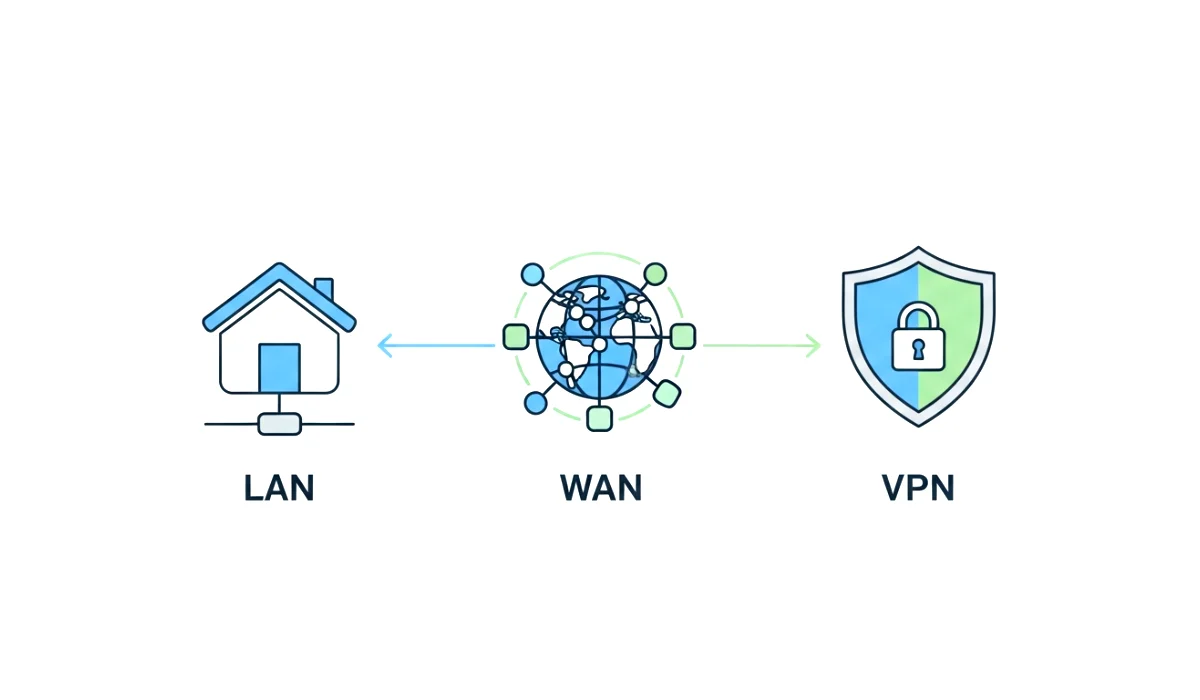
Have you ever tried to fix your WiFi or connect a new device and suddenly someone says, “Check your LAN settings” or “Maybe your VPN is messing with it”? And you sit there wondering why the world uses so many tech words that sound almost the same. I’ve been there too. Years ago, I remember trying to connect my first printer in my tiny apartment, and the guy on call said, “It should connect automatically on your LAN.” I nodded confidently… while quietly Googling what LAN even meant.
So if you’ve ever felt confused about LAN, WAN, or VPN, this guide is for you. Let’s break everything into simple words, real examples, and beginner friendly explanations. No fancy jargon, no deep tech talk, just clarity.
And trust me, once you understand these three, you’ll feel like the smartest person in the room whenever “network” talk pops up.
Now, let’s start exploring what LAN, WAN, and VPN really mean, how they differ, and where you actually use them in everyday life.
What Is LAN? (Local Area Network)
When you hear the term LAN, think SMALL, LOCAL, and PERSONAL. A LAN is basically a group of devices connected in a limited space. Imagine your home, office floor, school computer lab, or even a small shop. All devices inside that space form a LAN.
Simple example of a LAN
Picture your house for a moment. You have:
- A WiFi router
- Your phone
- A laptop
- A smart TV
- Maybe a gaming console
All of these devices talk to each other through one router. That little box creates your personal network. This is a LAN.
Why LAN matters
LAN gives you:
- Faster sharing of files between devices
- Smooth streaming and gaming
- Local connections like connecting a printer, CCTV, or hard drive
- A more secure private environment
Whenever you send a photo from your laptop to your phone using the same WiFi or connect to your home printer, you’re using a LAN.
How LAN works behind the scenes
Your router becomes the boss of your local network. It gives IP addresses to every connected device so they can communicate, like a teacher assigning roll numbers to students so no two kids use the same name.
LANs usually use Ethernet cables or WiFi. Ethernet gives more stability, while WiFi offers flexibility.
Where LANs are used
- Homes
- Offices
- Schools
- Shops
- Cafes with WiFi
Basically, anywhere tech devices sit close together.
What Is WAN? (Wide Area Network)
If LAN is your house, WAN is your entire city or even the whole world. WAN covers HUGE areas. It’s a network made by connecting smaller LANs.
Easy example of a WAN
Your internet connection is the perfect example. When you connect to a website from your home WiFi, your tiny LAN connects to the giant WAN we call the internet. Think of WAN as the world highway of data.
Why WAN exists
Because we need to connect:
- Cities
- Countries
- Offices across different locations
- Data centers and cloud servers
Imagine a company with offices in New York, London, and Mumbai. They all need to share the same data. They use WAN to stay connected across massive distances.
How WAN works
WAN uses complex infrastructure like:
- Fiber optic cables under oceans
- Satellites
- Mobile networks
- Internet service providers
It’s like a giant system of roads connecting billions of devices worldwide.
Where WAN is used
- The entire internet
- Mobile networks
- Companies with multiple branches
- Banks connecting ATMs nationwide
Without WAN, the world would feel like isolated islands.
What Is VPN? (Virtual Private Network)
Now, VPN is a little different. While LAN and WAN are physical networks, VPN is more of a protective layer.
Think of VPN as a secure tunnel inside the internet. When you use a VPN, your data travels through this private tunnel so no one can spy on what you’re doing.
Real example of using a VPN
Imagine you’re using public WiFi at an airport. Without a VPN, a hacker sitting nearby could try to snoop on your activities. But with a VPN on, your connection becomes encrypted and hidden.
Why people use VPN
Here are the most common uses:
- To stay safe on public WiFi
- To hide your IP address
- To change your virtual location
- To access blocked apps or websites
- To protect sensitive work files
How a VPN actually works
Your data gets encrypted (meaning locked with digital keys) before it leaves your device. Then it gets routed to a VPN server located somewhere else. Your actual location stays hidden, and websites see the VPN server instead of you.
Where VPNs are used
- Remote workers connecting to office networks
- Students accessing university portals
- Travelers securing their WiFi
- People wanting privacy while browsing
- Companies protecting confidential data
LAN vs WAN vs VPN: The Differences Explained Simply
Let’s break down the differences in the simplest way possible.
| Feature | LAN | WAN | VPN |
|---|---|---|---|
| Size | Small areas | Very large areas | Virtual network |
| Example | Home WiFi | Entire internet | Encrypted tunnels |
| Speed | Fast | Slower than LAN | Depends on server |
| Security | Local and quite safe | Exposed to global risks | Highly secure |
| Cost | Cheap | Expensive for companies | Usually low cost |
| Usage | Homes, offices | Countries, global networks | Privacy and security |
Which One Do You Use Daily?
Surprisingly, you use all three without even realizing it.
At home
You use LAN (your WiFi).
On the internet
You use WAN (global network).
While protecting your privacy
You use VPN (secure tunnel).
For example:
- Watching Netflix on home WiFi uses LAN.
- Connecting to Netflix’s servers uses WAN.
- If you use a VPN to watch content from another region, you’re creating a secure VPN connection.
It all works together.
Why Understanding LAN, WAN, and VPN Matters
Knowing these terms helps you:
- Fix network issues faster
- Choose the right internet equipment
- Stay safer online
- Understand how your devices communicate
- Improve your overall digital literacy
I remember one time my smart TV refused to detect my laptop. After 20 minutes of frustration, I realized both weren’t connected to the same LAN. Simple but huge difference.
Understanding these basics saves you from unnecessary headaches.
Let’s Dive Deeper With Real World Scenarios
To make things even clearer, let’s look at real life situations.
Scenario 1: Gaming at home
When you’re playing a local multiplayer game with friends on the same WiFi, you’re using LAN. That’s why it feels fast and smooth.
But the moment you play online with global players, your game uses WAN.
If you turn on a VPN to protect yourself from DDoS attacks or reduce ping, then your connection passes through a VPN server.
Scenario 2: Working from home
A company employee logs in from home using a VPN to access office files securely. Their home WiFi is a LAN, the internet is WAN, and the secure access is VPN.
Scenario 3: Using public WiFi
Your LAN becomes the public WiFi network, WAN connects you to apps, and VPN protects you inside that connection.
Advantages And Disadvantages Of LAN, WAN, And VPN
Benefits of LAN
- Fast
- Secure
- Cheap
- Great for file sharing
- Easy to manage
Disadvantages of LAN
- Limited to one location
- Needs router or switch
Benefits of WAN
- Connects the world
- Allows long distance communication
- Supports global businesses
Disadvantages of WAN
- Slower than LAN
- Can be costly
- More risk of cyber attacks
Benefits of VPN
- Safety on public WiFi
- Privacy from snooping
- Allows accessing restricted content
- Helpful for remote working
Disadvantages of VPN
- Slight performance drop
- Some cheap VPNs are unsafe
- Not all websites allow VPN access
Final Thoughts: LAN vs WAN vs VPN Explained Simply
So now that we’ve covered everything, here’s the simple summary:
- LAN is your local network inside your home or office.
- WAN connects multiple networks globally.
- VPN protects your online activities by creating a secure tunnel.
Once you understand these three, you become more confident with everyday tech. You can set up devices smarter, stay more secure online, and troubleshoot issues like a pro.
Try identifying your network type next time you connect to WiFi. You’ll suddenly feel more aware and empowered.
The real-world examples really make this post stand out. I’ve always thought of LAN as just ‘WiFi’ but now I get the difference between LAN, WAN, and VPN. It’s all about the scope!